13900KF vs 13700KF vs 7950x vs 7700x vs 5800x3d

Admin

Administrator
Moderator
Messages
4,377
#37
If you go with intel it might be better just go get a z690 motherboard since z790 doesn't offer any real advantages besides maybe better DDR5 overclocking support (it's higher officially at least).

MSI PRO Z690-A DDR4

MSI PRO Z690-A DDR5


All decent motherboards have a "bios flashback" feature where you can upgrade the bios without installing any other components besides the motherboard itself, you just need an usb stick with an appropriate bios file. Don't buy asus z690 board.

https://www.tomshardware.com/news/intel-600-series-boards-for-raptor-lake

One dilemma when you get a z790/z690 motherboard is that you are forced to choose between DDR4 or DDR5 support, you cannot get both at the same time with any board AFAIK.

https://www.techspot.com/review/2381-intel-z690-motherboard-vrm/

https://www.asus.com/news/oujwh1old5n6oglf/
 

Admin

Administrator
Moderator
Messages
4,377
#38
Are CPU benchmark unrealistic?
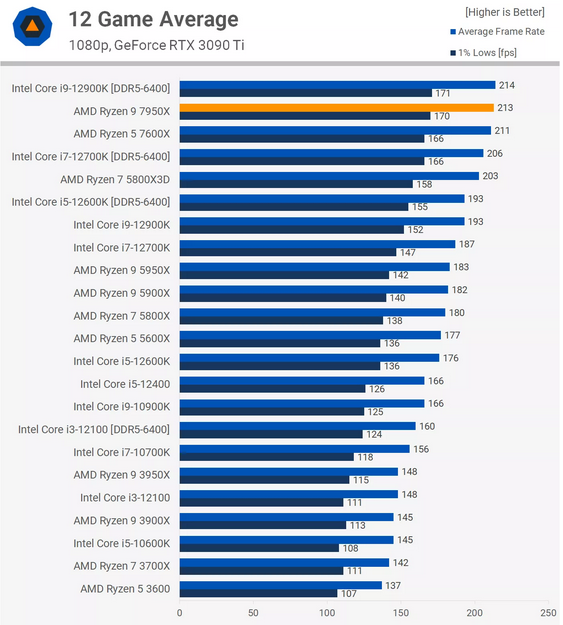
It is sometimes claimed that CPU benchmarks at 1080p or 720p with say 3090ti are unrealistic because "people don't actually play at these resolutions" but this is not quite correct.

0. DLSS, FSR and XeSS exists where the game is rendered at a lower resolution and upscaled.
1. Playing on a lower resolution to maximize framerate is common in e-sports.
2. People may later upgrade to a better GPU such as RTX 3090 and then the better CPU performance will come to greater use.

These days most prominent CPU reviewers such as gamers nexus will actually text CPUs at higher resolutions too even though the resolution shouldn't normally affect the CPU usage in CPU-bound scenarios.

It is worth noting that merely decreasing the resolution will not necessarily make a game less GPU bound since it's harder for a GPU to utilize all its cores at lower resolutions (the gpu might still boost a little bit higher but that will not add much performance). The better approach is usually to simply not run the game at the highest graphical settings if's severely GPU bound (rather than limited by CPU/monitor to a large extent) when DLSS/FSR/XeSS isn't available.
 

Admin

Administrator
Moderator
Messages
4,377
#39
Intel could have released a 12 or 16 core version with AVX-512
For reasons that are unclear to me they decided to instead waste space on estrogen cores and integrated GPU, this might be good for laptops and low-end desktop but it's not what you want for high end desktop systems.

raptor-lake-die.png

As we see here the 3-cores take up around 1/3 of the space of a p-core while delivering 1/3 of the MT performance, it's a really dumb approach for better MT performance.
 

Admin

Administrator
Moderator
Messages
4,377
#41
Why you shouldn't get 5800x3d unless you already got a suitable AM4 board
the 5800x3d has gotten a lot of praise online but it really isn't a particularly great options now.

Even at stock clocks the 13700KF will offer significantly better performance while being less than 10% more expensive for the CPU. It should perform about the same as the 12900KS in games while being significantly cheaper.

One big issue with the 5800x3d is that you are blocked from overclocking it but it's actually even worse on many motherboards, often you cannot even undervolt in bios forcing you resort to pbo2tuner which isn't available natively to linux. 13700KF will instead likely have a lot of overclocking headroom since it's the same die as the 13900K.

5800x3d looks like a great option for gaming in some reviews but in others it has a hard time even beating the 5900x

https://tech4gamers.com/ryzen-5800x3d-vs-ryzen-9-5900x/

You will get much better productivity performance with intel 13700KF:

1665185438981.png


1665185494835.png
 

Admin

Administrator
Moderator
Messages
4,377
#42
Productivity performance is more important for gaming performance
It really doesn't make sense to spend hundreds of dollars on a high-end CPU just for gaming. Being able to actually be productive and create value is far more important than getting 10 more fps in fortnite.

Often when you turn up the settings for a game you end up being completely GPU bound, this holds true even if you have an overclocked 3090ti. You might also be hard-limited by the refresh-rate of your monitor (especially at 4K).
 

Admin

Administrator
Moderator
Messages
4,377
#43
13700KF vs 13900KF
Obviously paying 170$ + VAT just to get 8 more e-cores would be rather questionable. The 8 extra e-cores does give around 25% better MT performance if the frequencies are the same but the price is 41% higher.

But very often with real workloads you will not actually be able to the 32 CPU-threads 12900KF offers particularly well. Even in productivity single-threaded performance is often the limiting factor.

But you don't just get more e-cores with 13900KF, you also get 6 MiB more l3 cache and higher stock frequencies.

The real question we want to answer is if the 13900K(F) will also overclock better than the 13700KF or if you end up largely paying for higher clocks from the factory. It might be the case that 13900K(F) will use the best dies while worse performing ones get sold as 13700K or 13900. The higher stock frequency also mean higher minimum silicon quality since otherwise it would have failed verification (they do need a satefy margin since some boards have bad VRMs, etc).
 

Mr.Andrews

Well-known member
Messages
93
#44
I think that if AMD is willing to survive, they need to focus on niche markets: better support for ECC memory, improvement of their gpus for the laptops, more power efficiency for the "ultrathin" laptops (they can crush intel in the laptop category if they want to), threadrippers with more cores.

In the desktop/gaymer/enthusiast they have nothing to win.

GPU: they have to improve their radeon prorender and make it at least as good as the default arnold/cycles, because as for now it fucking sucks. Basically they have to do what Nvidia did and go out write code for other companies to implement AMD-only solutions that work good for AMD cards.

But given the reputation that Nvidia cards currently have, I think AMD will be confined to just gayming and nothing else. And even in gayming, the Nvidia cards have peculiarities that make them "better", such as raytracing (not implemented everywhere but its another point of advantage for Nvidia). Nobody is going to buy AMD in the near future, not for their GPUs...
 

Admin

Administrator
Moderator
Messages
4,377
#45
Why intel might bring HEDT back to life
It just to be the case that you could get over 32 pci express lanes and quad channel memory without spending a furtone. Over time however it has become increasingly expensive and just to justify to buy anything better than the mainstream platform (such as AM4, z690). Intels last HEDT platform was x299 which is basically dead now (hadn't been updated with modern CPUs). AMD do sell HEDT CPUs but at very high prices.

The 16 core zen3 threadripper pro cost more than twice the price of the 16 core zen3 5950x.

More pci express lanes is very much good to have these days since it allows you to add more pci express cards and add nvme storage without losing bandwidth to the GPU. It's also useful if you use more than one GPU (basically dead for gaming but can be very useful for productivity).

While DDR5 memory does offer significantly better bandwidth than DDR4 that comes at the cost of higher latency. Quad channel DDR4 would be better in every way than dual channel DDR5.

Intel 'accidentally' showed a 34-core raptor lake CPU (only p-cores) recently indicating that they are returning to the HEDT market potentially forcing AMD to lower their HEDT prices.

https://www.tomshardware.com/news/intels-unannounced-34-core-raptor-lake-cpus-displayed-on-wafer

One big issue with raptor lake will be that the platform (LGA1700) is kinda dead with people being limited to just 16 gen5 lanes, a HEDT variant could offer something much better such as 80 gen5 lanes, 16 p-cores and AVX-512 support. Intel should also be able to offer ring-cache on HEDT but they might not bother to do that effort.
 

Admin

Administrator
Moderator
Messages
4,377
#46
AM5 clearly isn't HEDT
While it does have a lot of bandwidth that doesn't neccessarily translate well into good connectivity. You cannot easily split pci express 5 into double lanes of pci express 4, AMD may have tried that with the X670 chipsets but that seems to have failed (officially the connection is gen4 with noting stating something else).

No current GPU can utilize pci express 5, it will still run at gen4 speed even if you connect it to a gen5 slot.

We also didn't get any increase in the max number of cores. 7950x only has 16 cores which will struggle beat a power-unlocked 13900KF in multithreaded applications (with intel beating AMD in single-threaded tasks).
 

Admin

Administrator
Moderator
Messages
4,377
#47
7950x dies
He didn't even overclock that much, this shouldn't happen.


If it isn't safe to overclock 7950x that's another reason to get raptor lake instead.
 

Admin

Administrator
Moderator
Messages
4,377
#48
DDR5 vs DDR4
If you go with raptor/alder lake you will also have the option to buy a DDR4 motherboard. With DDR4 you will lose significant memory bandwidth even compared to budget DDR5 but instead you can save money or achieve lower latency.

Unfortunately good DDR4 is simply too expensive making it hard to justify, the issue with DDR4 is that samsung b-die is the only high performance option if unless you buy 32 GiB sticks.

https://www.youtube.com/watch?v=JT2184c63Tg

https://buildzoid.blogspot.com/2021/07/july-2021-ram-shopping-list.html

The 2x32 DDR4 kits he linked to are hard to find in stock and if you find it it will be so expensive it's not worth it.

1665919399850.png

This is a rare case of budget ddr5 beating 3600 CL16 (likely samsung bdie) but in most benchmark the budget DDR5 won.

https://www.guru3d.com/articles_pages/core_i9_12900k_ddr4_versus_ddr5_performance_review,6.html

Bdie DDR4 would likely be a better choice for quad-channel motherboards since then you get much better memory bandwidth (better than dual channel DDR5) and also much lower latency. When you only have 2 channels DDR4 is not a good option since you end up starving the CPU in terms of ram bandwidth which hurt the performance much more than the extra DDR5 latency impacts performance.

For gaming DDR4 is still fine
1665919978976.png


https://www.techpowerup.com/review/intel-core-i9-12900k-alder-lake-ddr4-vs-ddr5/4.html

Here they used cheaper samsung DDR5 and also didn't use expensive samdung Bdie ddr4 (probably) samsung memory tend to have the first 3 timings be similar or the same (such as 14-15-15-35 at 3600 MT/s).

DDR5vsDDR4.png


https://www.youtube.com/watch?v=omumzW1AtGE
 

Admin

Administrator
Moderator
Messages
4,377
#49
Using all 4 ram slots can be a bad idea
Motherboard manufacturers typically list what ram speeds that are supported, that will depend on how many ram sticks you use.

Let's take msi pro z790-p

• 1DPC 1R Max speed up to 7000+ MHz
• 1DPC 2R Max speed up to 6600+ MHz
• 2DPC 1R Max speed up to 6400+ MHz
• 2DPC 2R Max speed up to 5600+ MHz

DPC = how many ram sticks you use per channel (2 if you buy 4 sticks of ram, 1 if you only buy 2 sticks of ram).

1R = single rank (tends to be slower)
2R = dual rank (tends to be faster).

That does not mean that buying good DDR5 is completely pointless, you can still push for lower timings even if you cannot increase the frequency due to CPU/motherboard limitations. Generally however increasing the frequency is better since that also increases the memory bandwidth and the frequency of the memory controller in addition towering the latency in ns (if timings aren't changed).

https://www.msi.com/Motherboard/PRO-Z790-P/Specification

If you go for DDR4 however this will not really be a problem

• 1DPC 1R Max speed up to 5333+ MHz
• 1DPC 2R Max speed up to 4800+ MHz
• 2DPC 1R Max speed up to 4400+ MHz
• 2DPC 2R Max speed up to 4000+ MHz

https://www.msi.com/Motherboard/PRO-Z790-P-DDR4/Specification

btw: it's probably better to go for the much cheaper msi pro z690-A if you want to use DDR4 since it has the same DDR4 support while being much cheaper.
 

Admin

Administrator
Moderator
Messages
4,377
#50
zen4 has a bad memory controller
If you take a look at the x670e gene you will see that it doesn't support any more than 6400 MT/s which is a big sign that the memory controller on the CPU sucks, i didn't find them specifying what it was for dual rank but it's probably 6000 MT/s.

If we look at the x670e godlike we see that it officially supports 6400 MT/s when you use 4 single-rank ram-sticks so if you want the max ram performance with zen4 you actually want to use 4 ram single rank ram sticks.

• 1DPC 1R Max speed up to 6666+ MHz
• 1DPC 2R Max speed up to 6000+ MHz
• 2DPC 1R Max speed up to 6400+ MHz
• 2DPC 2R Max speed up to 4000+ MHz

You need to be careful with this since if you accidentally buy 4 dual rank ram sticks for zen4 it will be an utter disaster.

The much cheaper msi pro x670-p has basically the same official ram support.

• 1DPC 1R Max speed up to 6600+ MHz
• 1DPC 2R Max speed up to 6000+ MHz
• 2DPC 1R Max speed up to 6400+ MHz
• 2DPC 2R Max speed up to 4000+ MHz

They claim 66 higher MT/s more with the more expensive motherboard but only in single rank and 2 ram sticks (they incorrectly use "MHz" which is the incorrect unit, it's only half that in MHz).

Of course you actually want 128 GiB ram for serious productivity but if you try to do that with zen4 you are stuck to about the same frequency as 128 GiB DDR4 for raptor/alder lake (with worse performance due to higher latency).
 

Admin

Administrator
Moderator
Messages
4,377
#51
Good DDR5 memory for zen4
What you want is to find single rank ram sticks with 16 GiB each so you get a total of 64 GiB of memory, just having 32 GiB of DDR5 is just fine for gaming now but it's not particularly great for productivity and it doesn't really make sense to buy zen4 for gaming anyway, it only really makes sense for multi-threaded productivity and often in these cases you want to have at least 64 GiB of ram.

Only problem is that there isn't actually any 4x16 GiB DDR5 kits to buy currently but maybe you can find 2 single rank 2x16 GiB kits and hope they are a good match, you might think that this isn't a good solution and you are right. Best approach might be to simply wait for a 4x16 kit and hope that it will come any time soon.

Unfortunatily manufacturers/resellers typically don't specify if a 2x16 kit is single rank or dual rank. 32GiB sticks are always dual ranks and 8GiB sticks are always single rank but we are looking for 16 GiB sticks for zen4. This is almost certainly not worth the effort, just buy raptor lake and be happy or wait for zen5 (or upcoming intel CPUs after raptor lake).

It might be the case that all high-speed 2x16 kits are single rank (due to sk hynix dies being the only one satisfying the XMP specs) but i haven't verified this yet. So far the best 2x8 kit i have seen has been 6000CL40

4x8 did beat 2x8 significantly with zen3 https://www.youtube.com/watch?v=-UkGu6A-6sQ

We do however need to confirm that 4 single rank sticks actually clock higher than 2 dual rank sticks, so far we only have data from msi which isn't exactly reliable (they might not actually bother testing to the limit).
 

Admin

Administrator
Moderator
Messages
4,377
#52
Framechasers: 13900K is bad for overclocking
He was able to test an early sample tent to someone else. Both the CPU and ram did clock better than alder lake but it's a bit disappointed the difference wasn't larger.


CPU: 300mhz higher than 12900KS at the same voltage. They got all p-cores to 5600mhz with 1.35v (dropping down to 1.29 despite moderate LLC).

Ram: 7200MT/s max (+400MT/s) on msi unfiy x (2x single rank) unclear if limited by die or memory controller.

13900K3dmarkPcores.png

This is with the e-cores disabled.

I wouldn't trust him too much when it comes to overclocking but this might be the best we have for now.

It does however seem like it makes more sense to buy the cheaper 13700KF since it doesn't seem like you get much better overclocking headroom by going for the more expensive 13900K or 13700KF.
 

Admin

Administrator
Moderator
Messages
4,377
#53
13900K might not actually be binned overall better than 13700K
Intel might already be saving the best dies for 13900KS.

All cores working, good overclocker, working iGPU: 13900KS
All cores working, medium overclocker, working iGPU: 13900K or 13900KF
All cores working, bad overclocker: 13900 or 13900F

all p-cores working, good or medium overclocker: 13700K or 13700KF

If there isn't going to be a 13900KFS you are better of buying the 13900KF than the 13900K since versions where the iGPU doesn't work cannot be sold as 13900KS even if it overclocks very well. Of course intel could do artificial binning (soldering off the iGPU even though it's fully working) but most KF CPUs will probably be ones where the iGPU had to be disabled because of defect.

There was no 12900KSF or 12900KFS for alder lake and it's probably the equivalent with raptor lake. I did search for 13900KSF and 13900KFS and found nothing so it probably isn't going to be a thing. Therefore most likely 13900KF is on average better and slightly cheaper than the 13900K.

https://wccftech.com/roundup/intel-13th-gen-raptor-lake-cpus/

But if you want an integrated GPU you are probably increasing your chance of getting a good die by buying 13700K instead of 13900K.

If you look at the actual specs you will see that the all-core max turbo is just 100 Mhz higher for 13900K than 13700K which doesn't make much of a difference. It does not seem like 13700K will have much worse minimum silicon quality.

Code:
CPU     turbo0  turbo2  turbo3
13900K  5.8Ghz  5.7Ghz  5.4Ghz
13700K          5.4Ghz  5.3Ghz
turbo0 = Intel® Thermal Velocity Boost Frequency
tubro1 = Intel® Turbo Boost Max Technology 3.0 Frequency
turbo2 = Performance-core Max Turbo Frequency

13900K 13700K

Intel® Thermal Velocity Boost (Intel® TVB) is a feature that opportunistically and automatically increases clock frequency above single-core and multi-core Intel® Turbo Boost Technology frequencies based on how much the processor is operating below its maximum temperature and whether turbo power budget is available. The frequency gain and duration is dependent on the workload, capabilities of the processor and the processor cooling solution.

Intel® Turbo Boost Max Technology 3.0 identifies the best performing core(s) on a processor and provides increased performance on those cores through increasing frequency as needed by taking advantage of power and thermal headroom. Intel® Turbo Boost Max Technology 3.0 frequency is the clock frequency of the CPU when running in this mode.

The 13900K does however use a lot more power to reach these higher frequencies so it might not actually be better silicon, just more voltage for higher clock (and more cores). We might actually see something similar with the the 13900KS, it seems like only 2 cores will reach 6Ghz with it and that might be only due to higher voltage.

So the 13900KS might not actually have better silicon than the 13900K (also meaning 13900KF will not be better than 13900K).
 

Admin

Administrator
Moderator
Messages
4,377
#54
13900K performs well but power consumption is very bad
This might be why intel didn't allow proper reviews to be published until the launch day.

Turns out that the 125W figure is total nonsense which isn't so surprising. The real issue is that it uses 25% more energy than the 7950x to do the same work (stock settings).

1666361357945.png
 

Admin

Administrator
Moderator
Messages
4,377
#57
Buildzoid: 13600K clocks 400mhz higher than 12600K
Memory controller and ring-bus has also improved.


Enabling the e-cores added 50% MT performance when overclocked. From that we can that 8 e-cores have the same MT performance as 3 p-cores.

His 13900K did not clock better than his 13600k.
 

Admin

Administrator
Moderator
Messages
4,377
#58
Bang4BuckPC Gamer reached 5.8 Ghz
He was also able to reach use 5.1 Ghz ring clock with the e-cores enabled.


He didn't really go into how hard he has tested this OC, unclear if it would pass prime95 ?
 

Admin

Administrator
Moderator
Messages
4,377
#59
Undervolting data
Unfortunatily 13900K doesn't seem to have much undervolting heardroom. You can lower the power consumption but you cannot lower it much without also decreasing the performance.
1666358663443.png

He did claim that "Current Execution Protection" prevented him from undervolting the intel CPU further but that can be tuned off.

https://www.youtube.com/watch?v=wG6PXQnq4Dg
 

Admin

Administrator
Moderator
Messages
4,377
#61
13900K vs 12900K @ 1080p
13900k is 20% ± 5% faster on average than 12900K in gaming when both are max overclocked. The actual framerate difference however is often smaller due to limitations with our current GPUs (even in 1080p).


AMD fanboys are confident that 3d cache will allow zen4 to retake the gaming throne but it's not clear that the 3d cache would provide the 20% to 30% improvement needed to surpass raptor lake.
 

Admin

Administrator
Moderator
Messages
4,377
#62
There are basically 0 reasons left to disable E-cores
You can actually set the cache frequency to increase when e-cores aren't loaded at least on asus z790 boards.


The raptor lake cache actually clocks just fine with even when all e-cores are utilized so enabling this new feature probably isn't going to gain you much performance (maybe 1%).

Linux will be updated to utilize the e-cores better.

For windows there is process lasso to control what cores the programs are using, you can even force stuff to only use the e-cores if you want.
 

Admin

Administrator
Moderator
Messages
4,377
#64
Framechasers data: 13700K has higher IPC than 12900K
He claimed that there was no difference even when fps was 5% higher on raptor lake at the same frequencies.

https://youtu.be/B6ijtfJ7CXI?t=459

Him being a moron isn't exactly new but this data does fit from what we have seen in the earlier test by Bang4BuckPC Gamer

The title of the video was highly misleading. 5.3 ghz isn't close to max oc for 13700K, you can reach 6ghz on many/all p-cores with sufficiently capable custom watercooling (such as 2x 480mm radiators).
 

Admin

Administrator
Moderator
Messages
4,377
#65

Admin

Administrator
Moderator
Messages
4,377
#66
DDR5 recommendation for raptor lake
You want 2x32 GiB sk-hynix m-die. The only good options (for the price) i have found so far are these kits

https://www.gskill.com/product/165/371/1649667031/F5-6000J3238G32GX2-TZ5K-F5-6000J3238G32GA2-TZ5K

https://www.newegg.com/g-skill-64gb/p/N82E16820374412

https://www.gskill.com/product/165/377/1649749474/F5-6000J3238G32GX2-RS5K-F5-6000J3238G32GA2-RS5K

https://www.newegg.com/g-skill-64gb/p/N82E16820374411

Buildzoid did claim that M-die is actually better than the more expensive A-die when you are limited to lower frequencies by the memory controller due to it having loose timings. When you get 2x32 you get dual rank which does make it significantly harder for the memory controller to reach high frequencies (while providing better performance for the same frequency) so for 2x32 m-die should be just fine and there isn't much point in paying for anything 'better'.

Getting hold of these kits without overpaying tends to be pretty hard. I ended up having to buy from a swedish store i had a bad RMA experience with (it took over a months before they refunded me less than what i paid for the replacement).
 

Admin

Administrator
Moderator
Messages
4,377
#67
6ghz on all p-cores is a very real possibility with raptor lake
It does however require massive cooling and a lot of power supplied to the motherboard, you also need to get lucky with your sample. Core 5 here might be an example of a single bad core ruining the glory, only seems to reach around 5.7 ghz, the forum user also hasn't talked about doing any proper stability testing yet.
13900k.jpg

13900k6300mhz.jpg

cinebench23-2.jpg

This is seems to be around 5.7 Ghz p-core frequency for cinebench.

https://www.sweclockers.com/forum/trad/1674087-13900k-6300mhz-med-vattenkylning

The best approach for overclocking is probably to disable boost based on number of cores utilized and also "Terman Velocity Boost" and instead just have the power-consumption be the limiting factor, that makes it a lot easier to properly test for stability.
 

Admin

Administrator
Moderator
Messages
4,377
#68
The 10-core 7800x leak was fake
It seemed like AMD was finally going to release an 10-core CPU but that turned out to be a faked.


The issue is that AMD probably doesn't have enough enough defective dies to produce a significant volume of 10-core CPUs without artificial binning and then it's better for them just to do general price-cuts instead.

Most likely AMD will reserve the 7800 bramding for the 7800x3d
 

Attachments

Admin

Administrator
Moderator
Messages
4,377
#69
Why games benefit from e-cores
Games that load more than 8 threads can benefit from e-cores since an e-cores scale better with the number of threads than hyperthreading. i9-13900K(F) and i7-13700K(F) has just 8 performance cores so a lot of games will benefit from having these extra weaker physical cores over not having any extra cores at all.

1666973885964.png


https://www.computerbase.de/2022-10/intel-core-i9-13900k-i7-13700-i5-13600k-test/5/
 

Admin

Administrator
Moderator
Messages
4,377
#70
Computerbase: 13900K is 19% faster than 7950x
This test was done at 720p and here we look at the 1% low

1666974341218.png


https://www.computerbase.de/2022-10/intel-core-i9-13900k-i7-13700-i5-13600k-test/6/

The reason why the difference appears smaller in many comparisons is because you become you become GPU-bound a lot with modern titles, this is especially the case when a 30-series card is used. Merely lowering the resolution does not neccessarily make the game CPU-bound since lowering the resolution will make it more difficult for all GPU-cores to be utilized well.
 
Top